Friday, May 30, 2008

Malwarebytes Anti-Malware 1.14

malwarebytes_anti-malware.pngMalwarebytes is a site dedicated to fighting malware. Malwarebytes has developed a variety of tools that can identify and remove malicious software from your computer. When your computer becomes infected, Malwarebytes can provide the needed assistance to remove the infection and restore the machine back to optimum performance.

Key Features

  • Support for Windows 2000, XP, and Vista.
  • Light speed quick scanning.
  • Ability to perform full scans for all drives.
  • Malwarebytes’ Anti-Malware Protection Module. (requires registration)
  • Database updates released daily.
  • Quarantine to hold threats and restore them at your convenience.
  • Ignore list for both the scanner and Protection Module.
  • Settings to enhance your Malwarebytes’ Anti-Malware performance.
  • A small list of extra utilities to help remove malware manually.
  • Multi-lingual support.
  • Works together with other anti-malware utilities.
  • Command line support for quick scanning.
  • Context menu integration to scan files on demand.

Full post  

WinRAR 3.80 Beta 1


WinRAR is a powerful archive manager. It can backup your data and reduce size of email attachments, decompress RAR, ZIP and other files downloaded from Internet and create new archives in RAR and ZIP file format.

Features of WinRAR:
- Using WinRAR puts you ahead of the crowd when it comes to compression by consistently making smaller archives than the competition, saving disk space and transmission costs.
- WinRAR provides complete support for RAR and ZIP archives and is able to unpack CAB, ARJ, LZH, TAR, GZ, ACE, UUE, BZ2, JAR, ISO, 7Z, Z archives.
- WinRAR offers a graphic interactive interface utilizing mouse and menus as well as the command line interface.
- WinRAR is easier to use than many other archivers with the inclusion of a special "Wizard" mode which allows instant access to the basic archiving functions through a simple question and answer procedure. This avoids confusion in the early stages of use.
- WinRAR offers you the benefit of industry strength archive encryption using AES (Advanced Encryption Standard) with a key of 128 bits.
- WinRAR supports files and archives up to 8,589 billion gigabytes in size. The number of archived files is, for all practical purposes, unlimited.
- WinRAR offers the ability to create selfextracting and multivolume archives.
Recovery record and recovery volumes allow to reconstruct even physically damaged archives.
- WinRAR features are constantly being developed to keep WinRAR ahead of the pack.

Changes in Version 3.80 beta 1:
1. Added support for ZIP archives containing Unicode file names in UTF-8 format. When creating ZIP archive, WinRAR stores names in Unicode only if they cannot be stored correctly using the current single byte character set.
2. Added decompression support for WinZip AES encrypted ZIP archives.
3. Improved Unicode support for RAR and ZIP archive names.
4. "Ask before overwrite" and "Skip existing files" update modes are now available in archiving dialog. They allow to specify WinRAR behavior when updating already existing files in archive. Unlike already available "Fresh existing files only" and "Add and update files", these new modes ignore file date and compare only file names.

Command line equivalents of these modes are:
a) switch -o enables "Ask before overwrite" archiving mode;
b) switch -o- enables "Skip existing files" archiving mode;
c) switch -o+ enables "Overwrite all" mode (default for archiving).

5. New "Add to context menu" option in "Profile parameters" dialog. If this option is on, the profile name will be displayed in Explorer context menus allowing to activate a profile from context menu.
6. New -cp switch allows to select a compression profile in command line mode. It is supported only by GUI WinRAR.exe, not by rar.exe.
7. New "Options" page of archiving dialog contains the group of settings modifying the behavior of "Delete files after archiving" option from "General" page:
a) Delete files. Delete files normally like in previous WinRAR versions.
b) Move files to Recycle Bin. Deleted files are placed to Recycle Bin. Command line equivalent of this option is -dr switch.
c) Wipe files. Before deleting file data are overwritten by zero bytes to prevent recovery of deleted files. Command line equivalent of this option is -dw switch.
All these options have an effect only if "Delete files after archiving" is on. You can enable any of these options in the default compression profile to change the default behavior of "Delete files after archiving".
8. WinRAR "Extraction path and options" dialog is now resizable. You can use the mouse to drag its border to the desired size and provide more space for folder tree pane. WinRAR will store new dimensions of this dialog.
9. New "Update" SFX script command and "Update mode" group of options in "Update" page of "Advanced SFX options" dialog. These command and options allow to check time and implement file time based updating;
10. SFX script "Shortcut" command and "Add shortcut..." command in "Advanced SFX options" dialog now allow to specify an icon file containing an icon associated with shortcut.
11. New "Wipe temporary files" option in "Settings/Security" dialog provides more secure, though slower, way to delete temporary WinRAR files.
12. WinRAR and RAR display the total progress bar when unpacking a multivolume RAR archive if all volumes are present in the same folder.
13. WinRAR and RAR automatically expand names of environment variables in list files. For example, a list file can contain lines like: %windir%\*.exe, %USERPROFILE%\Desktop
This feature is available only in Windows RAR version.
14. Added support of TAR archives with non-zero "extra field" data.
15. Added support of TAR archives, which does not contain the end of archive entry consisting of 512 zero bytes.
16. Improved Unicode support when dragging files from WinRAR window.
17. Shift+Tab key combination can be used in main WinRAR window to switch the input focus between interface elements (files, comment, tree, address) in reverse order. In previous versions Shift+Tab used the same order as Tab.
18. Corrected a possible WinRAR crash when opening truncated UDF ISO files.


WinRAR 3.80 Beta 1

1.2 MB


Working Key Only

Full post  

Thursday, May 29, 2008

IZArc version 3.81 Build 1550


Sometimes you receive emails with zip files, rar files or any other "strange" archive files attached and you are wondering how to open them. Stop looking for solution! IZArc is the right choice. It can unzip (extract) almost any archive file types.

If you have many documents containing confidential information or you just want to back up your files you can use IZArc to create password protected archives secured with strong AES encryption.


    Full Windows Vista compatible!

    IZArc is the ultimate freeware archive utility supporting many archive formats like: 7-ZIP, A, ACE, ARC, ARJ, B64, BH, BIN, BZ2, BZA, C2D, CAB, CDI, CPIO, DEB, ENC, GCA, GZ, GZA, HA, IMG, ISO, JAR, LHA, LIB, LZH, MDF, MBF, MIM, NRG, PAK, PDI, PK3, RAR, RPM, TAR, TAZ, TBZ, TGZ, TZ, UUE, WAR, XXE, YZ1, Z, ZIP, ZOO. With a modern easy-to-use interface, IZArc provides support for most compressed and encoded files, as well as access to many powerful features and tools. It allows you to drag and drop files from and to Windows Explorer, create and extract archives directly in Windows Explorer, create multiple archives spanning disks, creating self-extracting archives, repair damaged zip archives, converting from one archive type to another, view and write comments and many more. IZArc has also build-in multilanguage support.

With IZArc you can open CD image files like ISO, BIN, CDI and NRG. It is also possible to convert such files from one type to another (BIN to ISO, NRG to ISO).

If you need to send large files to your colleagues, friends or customers who may not have archiving tool you can easily create self-extracting archive that can be extracted by simple double click.

IZArc can be configured to run your preferred Anti-Virus scanner when you open any archives.

IZArc supports 256-bit AES encryption to secure your data.

IZArc is integrated in Windows so you can perform all archiving operations by using right-click menus in Windows Explorer.

If you have broken archives IZArc can help you to repair them with ease.

IZArc is 100% virus free and it doesn't contain any spyware or adware.

IZArc is the most complete archive utility available today.


Version 3.81 Build 1550

-Fixed: Zip files and folders with non English names
-Fixed: Split/Merge Zip archives containing non English filenames
-Fixed: Extract CAB SFX archives
-Fixed: Show the amount of extracted files from TGZ archives.
-Updated translations


Version 3.8 Build 1510


-Fixed: Shell context menu under Windows Vista (Now IZArc is 100% Vista (32-bit) compatible)
-Fixed: Confirm File Overwrites when extracting *.tar.gz archives
-Fixed: Compress folders with file names beginning with dot (.test)
-Fixed: Shortcuts working directory when do CheckOut
-Fixed: Modify and update files in subfolders
-Fixed: Drag and Drop folder from an archive to Windows Explorer does not extract subfolders
-Fixed: Extraction process is terminated if some error occurs
-Fixed: Extract multi-volume ARJ archives
-Fixed: Check for update
-Fixed: Zip SFX archive crashes when is unable extracting directory to be created
-Added option to compress/extract archives in background (low process priority)
-Added 7-Zip SFX creation support
-Updated UnRar library
-Some small improvements
-Updated translations


Full post  

Wednesday, May 28, 2008

Adobe Reader 8.1.2 Windows Vista, English

reader_icon_special.jpg
Adobe® Reader® software is the global standard for electronic document sharing. It is the only PDF viewer that can open and interact with all PDF documents. Use Adobe Reader to view, search, digitally sign, verify, print, and collaborate on Adobe PDF files.

Deploy, maintain, and support Adobe Reader across your organization. Corporations, government agencies, and educational institutions can distribute Adobe Reader internally on an intranet site or local network.

Adobe Reader software is available for distribution through physical media: CD, DVD, or bundled with computers. Adobe Reader Enterprise Edition has been developed for easy deployment.

nterested in developing a plug-in for Adobe Reader? The freely distributed Adobe Reader is widely available; more than 500 million copies have been distributed worldwide since 1993. To build a Reader plug-in, you must first apply for an Integration Key License Agreement.


Full post  

Convert Word to PDF Universal Document Converter 4.2

Convert Word to PDF

The exchange of documents in the PDF format is a sign of consideration. Con

verting documents from Microsoft Word to PDF format gives you the ability to email documents to customers in change-protected mode, to replicate presentation materials in printshops without any troubles with missing fonts or broken layouts. Plus, converting documents from Word to PDF allows you

to prepare them for archiving.

Universal Document Converter is the most complete solution for the conversion of documents into Adobe PDF or graphical files. The underlying basis of Universal Document Converter is the technology of virtual printing. As a result, converting Word to PDF format is not any more complicated than p

rinting on a desktop printer.

Play video tutorial

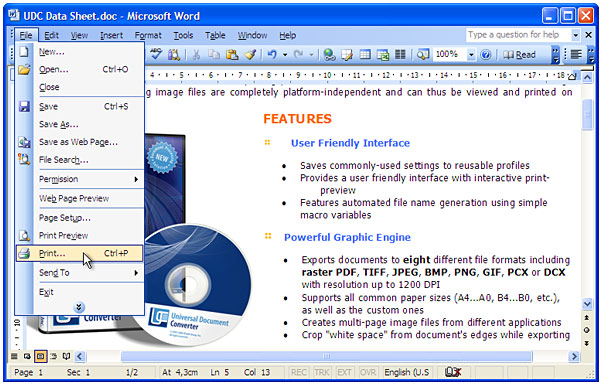
How to Convert Word to PDF

  1. Download and install Universal Document Converter software onto your computer.
  2. Open the document in Microsoft Word and press File->Print... in application main menu.


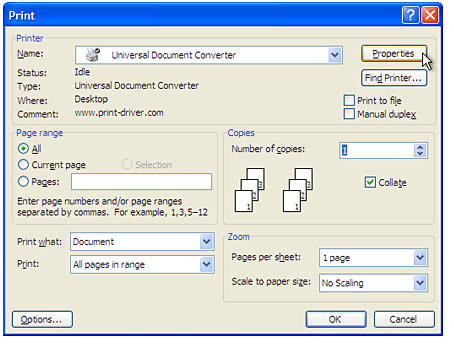
  3. Select Universal Document Converter from the printers list and press Properties button.


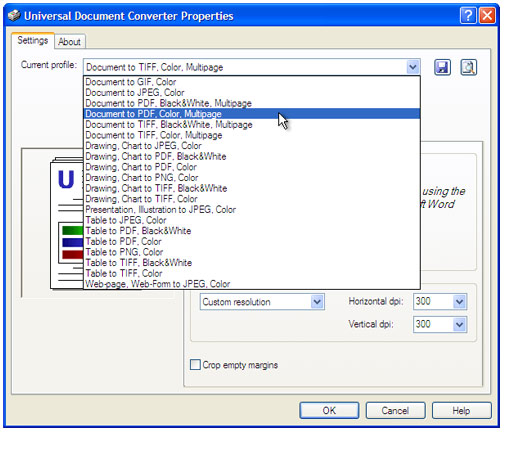
  4. Select the Document to PDF, Color, Multipage profile in the Universal Document Converter Properties window and press OK.


  5. Press OK in Microsoft Word Print dialog to start converting. When the PDF file is ready, it will be saved to the
    C:\UDC Output Files folder by default.
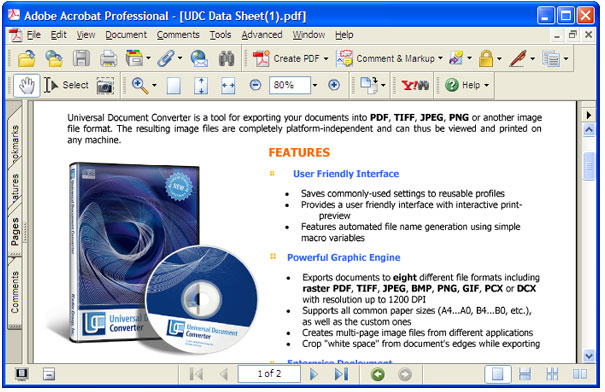
    Converting Word to PDF in progress.
  6. Converted document will then be opened in Adobe Acrobat or another viewer associated with PDF files on your computer.

Frequently Asked Questions

Q1: I need to convert text-only documents to PDF format. How can I reduce the size of the PDF file?
A1: Please use the Document to PDF, Black&White, Multipage profile in step 4 in the instructions above.

Q2: How do I keep 100% of the quality of the presentation when I convert it to PDF?
A2: After selecting Document to PDF, Color, Multipage profile in the Printing Preferences window, please change Color Depth value to True Color (24 bpp). Plus, open the Page Setup tab in the Printing Preferences window and increase the Image Resolution setting to 600 x 600 DPI.

Q3: How to append all Word documents I have to one multipage PDF?
A3: Please open the Output tab in the Universal Document Converter Properties window. Select Append all pages to existing PDF file in Options drop down in bottom part of the window.

Q4: How can I keep the background color or background image when I convert a document from Word to PDF?
A4: Please press File-Print... in Microsoft Word main menu. In Print window press the Options... button. Enable the Background colors and images check box in the middle-right area of the window.

Q5: I need to convert daily about 150 documents from Word to PDF. How can I automate this task?
A5: PrintConductor software can print Word documents in batch mode. If you select Universal Document Converter from the printers list, PrintConductor will use it for converting documents from Word to PDF instead of printing them on desktop printer.

Q6: I need to convert Word to PDF myself using VB.NET. Do you have any examples?
A6: Yes, you can find source code examples for Visual Basic and Visual C++ in Developer Solutions section of Universal Document Converter�s site.


Convert Word to PDF


16.15 MB


System requirements

  • Microsoft Windows 98, Windows Me, Windows NT4, Windows 2000, Windows XP, Windows 2003 or Windows Vista
  • Universal Document Converter can print from 32-bit applications only
  • Universal Document Converter does not print for DOS applications
  • Intel Pentium 100 MHz or above
  • 64 MB or more RAM
  • Hard disk free space: 10 Mb for the program files, 100 Mb for output files, 100 Mb of system disk space for a swap-file


Latest release - Version 4.2 (April 29, 2008)


What's new in the current version:

  • Improved performance for heavy loads (converting thousands of documents)
  • Corrected installation under Windows Vista (32 bit edition)
  • Significantly improved the printing quality of black and white documents in fast dithering mode
  • Improved compatibility with Microsoft Excel
  • Added a list of templates for managing the name of the destination folder and converting documents
  • Added the ability to install program on computers without disk C:
  • Added a Russian version of the program and a Russian web-site
Full post  

Followers

HMB™ Softwares © 2008-2009. Template by HMB™.

▲TOP